Vegastars Mobile Australia: Browser Access, iPhone and Android
 Available in AU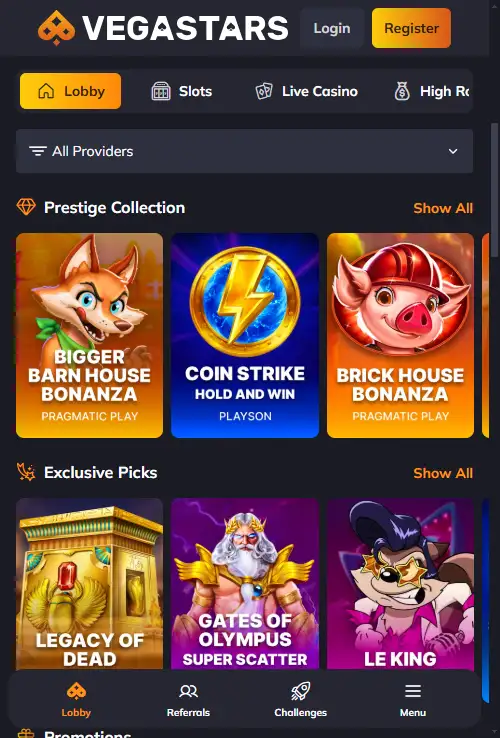
Mobile guide – Australia
The current Vegastars mobile route is the website in a phone browser. No official native iOS or Android casino app is identified on the current operator site or in the major official app stores. That means Australian users do not need an APK or third-party download page to reach the service. The safer approach is to open the current Vegastars site in Safari, Chrome or another modern browser, sign in through the normal account interface and treat any app-store result or download claiming the brand name as unverified unless the casino itself links to that exact listing.
Table of Contents
- Vegastars mobile is a browser experience first
- iPhone: use Safari or another trusted browser
- Android: avoid APK files unless the operator can verify them
- Native app, web app and browser shortcut are not the same
- What to expect from the mobile site
- A safe checklist for any future Vegastars app claim
- Mobile performance is more than screen size
- How to check mobile feature parity without installing anything
- Why the verified Vegastars mobile route matters more than an app download
Vegastars mobile is a browser experience first
Vegastars supports HTML5/browser access, and no native app is currently identified. For a user with an iPhone or Android handset, the practical route is therefore straightforward: use the mobile website rather than searching for an installer.
This distinction matters because “app” is often used loosely in casino search results. A site that works as an app-like mobile experience can still be a normal browser service, with no package installed from Apple’s App Store or Google Play. Browser access also means the account remains tied to the same web login rather than a separate mobile-only registration.
If your main question is what you can play once signed in, the Vegastars games covers the current game categories rather than repeating the catalogue here.
iPhone: use Safari or another trusted browser
On iPhone, there is no need to install an unverified profile or sideload an unknown package just to access the verified mobile route. Open the current site in Safari or another browser you already trust. The responsive site should adapt navigation, account controls and game browsing to the narrower screen.
You may choose to add a website shortcut to the iPhone Home Screen using the browser’s built-in tools. That can make the site feel more app-like, but it does not turn the shortcut into a native Vegastars iOS application. The distinction is useful when assessing permissions, updates and provenance: a browser shortcut still opens web content under the browser’s security model.
Android: avoid APK files unless the operator can verify them
Android makes third-party installation technically easier, which also makes brand-name ambiguity more important. Search results can contain unrelated apps, generic casino products or packages using similar names. In the current checks, Google Play surfaced apps named “Vegastars” that were unrelated to the Vegastars casino brand. Those results are not evidence of an official casino application.
The verified route remains the mobile website. That removes the need to enable installation from unknown sources or trust an APK-hosting page. If Vegastars later publishes a native Android app, the safe standard is an official operator link to the exact store listing, with a publisher identity that can be reconciled with the brand.
For registration and login questions, use the separate registration and account page rather than relying on instructions attached to a third-party download.
Native app, web app and browser shortcut are not the same
| Format | How it is opened | What it means for Vegastars today |
|---|---|---|
| Native iOS app | Installed from an attributable App Store listing | No official native listing identified in the current checks |
| Native Android app | Installed from an attributable Google Play listing or verified operator distribution | No official native casino app identified in the current checks |
| Mobile website | Opened in Safari, Chrome or another browser | Verified access route |
| Home-screen shortcut | Saved from the browser | Convenience link to the website, not proof of a native app |
This terminology prevents a common mistake: assuming every “download” result is a better or more official mobile route than the website itself.
What to expect from the mobile site
A browser-based casino experience should preserve the core account relationship across desktop and mobile because both views use the same web service. The useful comparison is therefore feature access, not whether a separate app exists. Check whether the current mobile layout exposes the game lobby, account area, cashier and support route you need without forcing horizontal scrolling or an external installer.
The verified game mix and payment categories are documented on their own pages. If you are evaluating the mobile experience specifically for depositing, read the payment methods guide and then confirm what the cashier displays on your handset. If you want pokies, compare the mobile lobby against the pokies categories shown on the site rather than assuming every desktop tile is necessarily visible in the same order.
On smaller screens, it is also worth checking that account and cashier controls remain easy to reach before starting a session. A responsive layout is useful only when the essential controls remain clear at the point you need them.
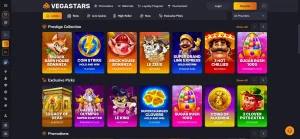
Because casino lobbies are dynamic, saved images can age quickly. The purpose of the image on this page is to demonstrate the real browser route and responsive layout, not to freeze a permanent catalogue.
A safe checklist for any future Vegastars app claim
- Start from the operator’s current website, not a search-ad or APK directory.
- Look for a direct link from the operator to the exact Apple or Google listing.
- Check that the publisher identity and branding are consistent with the casino, not merely the app title.
- Read the requested permissions before installing.
- Do not install an Android package just because a page says it is the “official APK”.
- Avoid profiles, certificates or sideloading instructions that cannot be traced to the operator.
- If no attributable store listing exists, use the browser route instead.
This checklist is intentionally stricter than matching by name. The current Google Play search illustrates why: unrelated apps can use “Vegastars” in their title while describing cooking logs or arcade/puzzle gameplay. Name similarity alone is not provenance.
Mobile performance is more than screen size
A phone-friendly layout should keep controls readable, images within the viewport and tables or long content from spilling sideways. Connection quality also matters, especially for streamed live-casino content. If a game session is sensitive to latency, a stable connection can matter more than whether the experience runs inside an installed shell or a browser tab.
For privacy, a browser also gives users familiar controls for cookies, saved passwords and site permissions. Those controls do not remove the need to protect the casino account itself: use a unique password, avoid shared devices where possible and sign out when the device is not under your control.
The Australia FAQ collects common cross-site questions, while this page stays focused on the mobile access route.
How to check mobile feature parity without installing anything
Because the current route is browser-based, the practical comparison is between the desktop and mobile versions of the same account rather than between a website and a separate app product. After signing in through the normal site, check whether the functions you actually use remain available at phone width: account access, the game categories you browse, the cashier entry point, current promotions and support. A responsive page can rearrange menus or hide secondary controls behind icons, so the useful test is whether the task is still reachable, not whether the layout looks identical to desktop.
The same principle applies to a home-screen shortcut. Adding a browser shortcut can make the site launch in an app-like way, but it does not create a native iOS or Android application. It should still open the operator’s website and use the same account session. If a future native-app claim appears, verify it through an official operator link and the relevant official app store before installing anything.
Browser maintenance can also affect the experience. If a page fails to load correctly, first check the current site address, browser updates, connection quality and ordinary browser permissions. None of those steps requires a third-party installer or an unverified download page.
For routine use, bookmark the current operator page rather than relying on a search result each time. That reduces the chance of mistaking a similarly named page for the browser service you previously used.
Why the verified Vegastars mobile route matters more than an app download
For Australian users, the important fact is not whether the service can be described casually as an “app”. It is whether the access route can be tied to Vegastars itself. Currently, the mobile website is the documented route, and no official native iOS or Android casino listing is identified.
Using the browser avoids a class of unnecessary uncertainty around lookalike store entries and third-party APKs. If the operator later publishes and links a genuine native app, that status can be checked again. Until then, the website is the current route for mobile access.
For a related overview, see Vegastars Australia review.